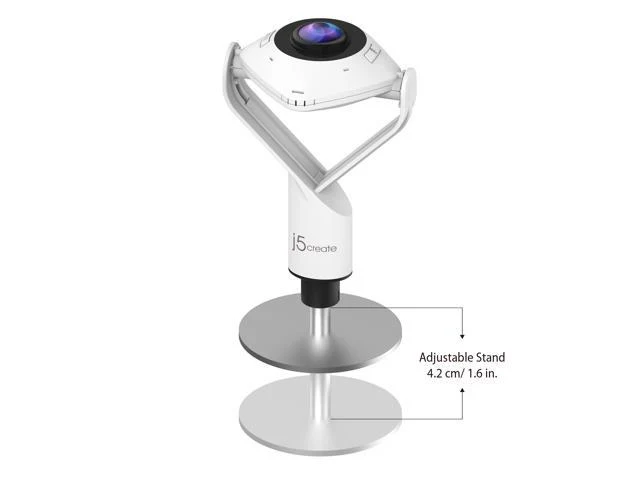
j5create 360° All Around Webcam
j5create 360° All Around Webcam
Item #: 9SIV2D7JGJ8921|Mfr. Part #: JVCU360
- 360° video conferencing camera
- Built-in omnidirectional microphone
- Six display modes deliver exceptional viewing angles with flexibility and versatility
- Adjustable fields of view
- Full HD 1080p video playback @ 30 Hz
- USB™ UVC/UAC plug-and-play
- Touch bar to specify participants’ location
- Some applications cause the image to appear reversed. In this situation, you can press and hold the “mode” button for 3 seconds to reverse the image on the screen.
With the
Model: JVCU360, you can enhance your conference calls with 360° video and omnidirectional audio. The 360° camera is plug-and-play, meaning there is no driver installation required.
The Model: JVCU360 supports 1080p video playback @ 30 Hz with several different display modes including full screen, all around view mode, host, dual host, single view mode and wide angle view mode. Supports your favorite video conferencing apps: • Skype™ • Skype™ for business • Microsoft Teams™ • Google Meet™ • Cisco® • Zoom™ • BlueJeans™ • Amazon Chime™ • GoToMeeting® • Slack™
| Brand | j5create |
|---|---|
| Name | 360° All Around Webcam |
| Model | JVCU360 |
| Part Number | JVCU360 |
Details
| Color | White |
|---|---|
| Interface | USB 2.0 |
| Max. Image Resolution | 1920 x 1080 |
| Video Capture Resolution | 1920 x 1080 |
| Focus Settings | auto |
| Lens | Ultra-Wide Angle Lens |
| Operating Systems Supported | • Available USB-C™ or USB™ Type-A port • Windows® 10 • macOS® with UVC support • Chrome OS™ with UVC support • Operating systems with standard UVC/UAC drivers |
Features
| Features | • 360° video conferencing camera • Built-in omnidirectional microphone • Six display modes deliver exceptional viewing angles with flexibility and versatility • Adjustable fields of view • Full HD 1080p video playback @ 30 Hz • USB™ UVC/UAC plug-and-play • Touch bar to specify participants’ location • Some applications cause the image to appear reversed. In this situation, you can press and hold the “mode” button for 3 seconds to reverse the image on the screen. |
|---|
Package Contents
| Package Contents | Package Contents • 1 - JVCU360 • 1 - Quick Installation Guide |
|---|
j5create 360° All Around Webcam
Item #: 9SIV2D7JGJ8921|Mfr. Part #: JVCU360
- 360° video conferencing camera
- Built-in omnidirectional microphone
- Six display modes deliver exceptional viewing angles with flexibility and versatility
- Adjustable fields of view
- Full HD 1080p video playback @ 30 Hz
- USB™ UVC/UAC plug-and-play
- Touch bar to specify participants’ location
- Some applications cause the image to appear reversed. In this situation, you can press and hold the “mode” button for 3 seconds to reverse the image on the screen.
With the
Model: JVCU360, you can enhance your conference calls with 360° video and omnidirectional audio. The 360° camera is plug-and-play, meaning there is no driver installation required.
The Model: JVCU360 supports 1080p video playback @ 30 Hz with several different display modes including full screen, all around view mode, host, dual host, single view mode and wide angle view mode. Supports your favorite video conferencing apps: • Skype™ • Skype™ for business • Microsoft Teams™ • Google Meet™ • Cisco® • Zoom™ • BlueJeans™ • Amazon Chime™ • GoToMeeting® • Slack™
| Brand | j5create |
|---|---|
| Name | 360° All Around Webcam |
| Model | JVCU360 |
| Part Number | JVCU360 |
Details
| Color | White |
|---|---|
| Interface | USB 2.0 |
| Max. Image Resolution | 1920 x 1080 |
| Video Capture Resolution | 1920 x 1080 |
| Focus Settings | auto |
| Lens | Ultra-Wide Angle Lens |
| Operating Systems Supported | • Available USB-C™ or USB™ Type-A port • Windows® 10 • macOS® with UVC support • Chrome OS™ with UVC support • Operating systems with standard UVC/UAC drivers |
Features
| Features | • 360° video conferencing camera • Built-in omnidirectional microphone • Six display modes deliver exceptional viewing angles with flexibility and versatility • Adjustable fields of view • Full HD 1080p video playback @ 30 Hz • USB™ UVC/UAC plug-and-play • Touch bar to specify participants’ location • Some applications cause the image to appear reversed. In this situation, you can press and hold the “mode” button for 3 seconds to reverse the image on the screen. |
|---|
Package Contents
| Package Contents | Package Contents • 1 - JVCU360 • 1 - Quick Installation Guide |
|---|
Description
j5create 360° All Around Webcam
Item #: 9SIV2D7JGJ8921|Mfr. Part #: JVCU360
- 360° video conferencing camera
- Built-in omnidirectional microphone
- Six display modes deliver exceptional viewing angles with flexibility and versatility
- Adjustable fields of view
- Full HD 1080p video playback @ 30 Hz
- USB™ UVC/UAC plug-and-play
- Touch bar to specify participants’ location
- Some applications cause the image to appear reversed. In this situation, you can press and hold the “mode” button for 3 seconds to reverse the image on the screen.
With the
Model: JVCU360, you can enhance your conference calls with 360° video and omnidirectional audio. The 360° camera is plug-and-play, meaning there is no driver installation required.
The Model: JVCU360 supports 1080p video playback @ 30 Hz with several different display modes including full screen, all around view mode, host, dual host, single view mode and wide angle view mode. Supports your favorite video conferencing apps: • Skype™ • Skype™ for business • Microsoft Teams™ • Google Meet™ • Cisco® • Zoom™ • BlueJeans™ • Amazon Chime™ • GoToMeeting® • Slack™
| Brand | j5create |
|---|---|
| Name | 360° All Around Webcam |
| Model | JVCU360 |
| Part Number | JVCU360 |
Details
| Color | White |
|---|---|
| Interface | USB 2.0 |
| Max. Image Resolution | 1920 x 1080 |
| Video Capture Resolution | 1920 x 1080 |
| Focus Settings | auto |
| Lens | Ultra-Wide Angle Lens |
| Operating Systems Supported | • Available USB-C™ or USB™ Type-A port • Windows® 10 • macOS® with UVC support • Chrome OS™ with UVC support • Operating systems with standard UVC/UAC drivers |
Features
| Features | • 360° video conferencing camera • Built-in omnidirectional microphone • Six display modes deliver exceptional viewing angles with flexibility and versatility • Adjustable fields of view • Full HD 1080p video playback @ 30 Hz • USB™ UVC/UAC plug-and-play • Touch bar to specify participants’ location • Some applications cause the image to appear reversed. In this situation, you can press and hold the “mode” button for 3 seconds to reverse the image on the screen. |
|---|
Package Contents
| Package Contents | Package Contents • 1 - JVCU360 • 1 - Quick Installation Guide |
|---|